
Chord Demix is a set of devices that separate notes from chords. It works within a single instrument rack or across multiple tracks. Unlike other similar devices, Chord Demix sends notes without the need to set send/receive IDs in the devices. This allows for a seamless workflow, as when loading presets, you don’t have to worry about interference with other devices in the project.
To use Chord Demix in a rack, follow these steps:
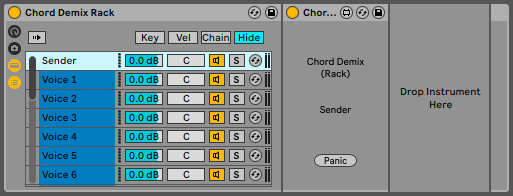
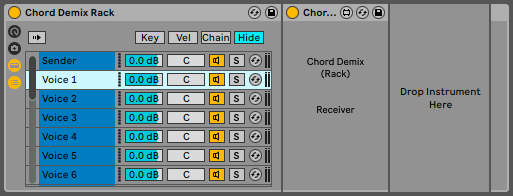
- Insert an instrument rack.
- In the first chain, insert “Chord Demix (Rack) Sender.”
- In subsequent chains, insert “Chord Demix (Rack) Receiver”.
The received chord is split into the chains in ascending order. This is the lowest note first, then the following notes.
You can also create a chain using “Chord Demix (Rack) Receiver” and an instrument, then duplicate the chain multiple times. It supports up to 16 notes/16 chains. The download includes a preset for use in Live 12.
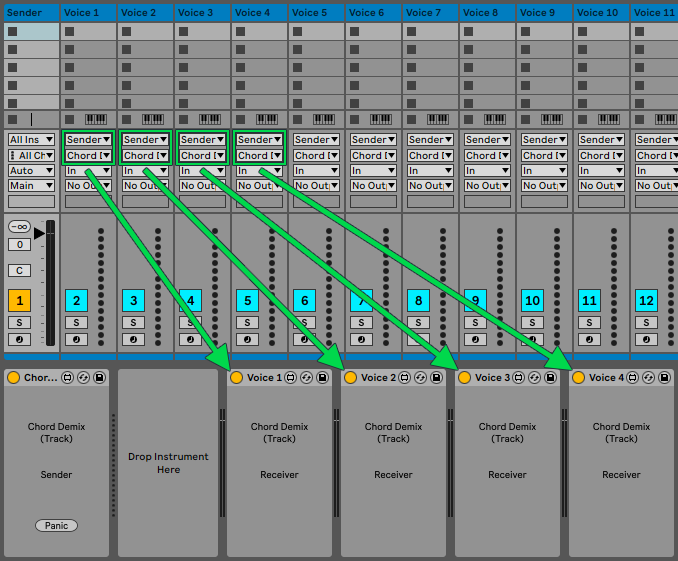
To use Chord Demix across multiple tracks, the Sender and all Receivers must be on the same MIDI track. This gives the track additional MIDI outputs for each voice. For the inputs of the tracks where the notes will be received, the Sender track and the corresponding channel for each voice must be selected. Renaming the Receivers helps when selecting track inputs. The download includes a preset for use in Live 12.
This device is free. Consider making a contribution if it is useful for you.