
Capture audio and insert it into the project with a single click. Mimics the behavior of Live’s capture MIDI feature but for audio inputs.
Main features
- Capture audio from external input sources or project tracks.
- Save captured audio to disk and automatically insert it into a project track.
- Captured audio can be inserted as a Session Clip or directly into the Arrangement.
- Audio can be captured from up to 16 input sources simultaneously.
- Auto-Reset mode similar to Capture MIDI. The internal buffer is cleared every time the transport is started.
- Captured audio is saved in a custom folder or automatically inside the project folder.
- Name customization of the created audio files.
- Alternative single input version that works in the track’s effects chain.
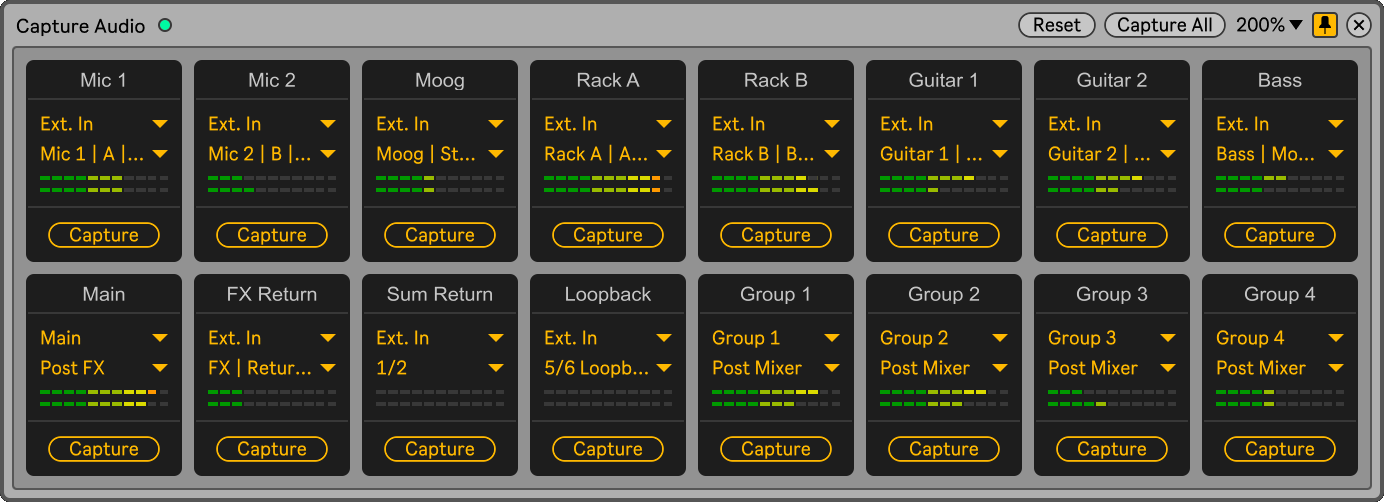
The device has a maximum of 16 inputs. Depending on the inputs selected in the settings, the floating window displays 4, 8, or 16. Multiple instances of the device can be used simultaneously to increase the number of recording inputs.
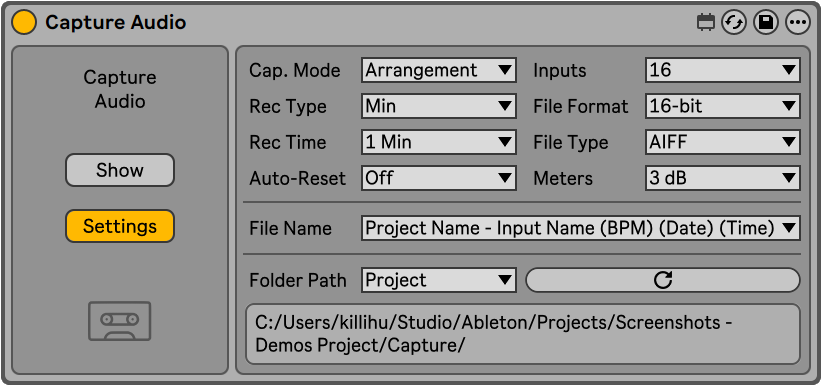
In the device Settings it is possible to set the capture mode, recording time (in minutes or bars), number of inputs to use and format of the captured audio files. As well as the fields used to name the captured audio files and the folder where they will be saved.
Check the manual before buy.
Buy Capture Audio now and get the latest version. Then later, all future updates free.
Showcase video
